貳、Place a floating app bar above a list

參見: Place a floating app bar above a list

通常在滾動時,為了要讓使用者更好看到欲呈現的資訊,又不讓資訊範圍遮蓋到視窗大小,我們會使用SliverAppBar用來建立一個具有可折疊效果的AppBar。以下我們將分為三個部分呈現製作步驟

一、Create a CustomScrollView

我們會先在Scaffold的body中,創建:

CustomScrollView: 用於放置整個滾動項目(SilverAppBar與SilverList)

slivers: 放置SliverAppBar

並且可以注意,在這個Scaffold中,我們並沒有用到在Basic Widgets中介紹的AppBar屬性,轉而代之,只有body本體

1
2
3
4
5
6
Scaffold(
// 沒有appBar屬性,只有body本體
body: CustomScrollView(
// 下一步驟中將會在silver中添加SilverAppBar與SilverList
slivers: <Widget>[]),
);

二、Use SliverAppBar to add a floating app bar

接著,我們在CustomScrollView的silvers中添加SliverAppBar的部分,包含

expandedHeight(double):展開高度。

floating(bool):向下捲動時SliverAppBar是否固定在頂部。 如果設定為false,則應用程式列在向下捲動時將「不會」固定在頂部,而會一直可見。

pinned(bool):滾動時是否將標題固定在頂部。 如果設定為true,則當使用者向上捲動時,標題將固定在頂部,以便繼續顯示在檢視中。

flexibleSpace(FlexibleSpaceBar):這裡使用FlexibleSpaceBar,一個用於自訂silverAppBar的元件。

  • title:silverAppBar的標題文字。

  • background:背景圖片

1
2
3
4
5
6
7
8
9
10
11
12
13
14
15
CustomScrollView(
slivers: [
// 添加SilverAppBar
const SliverAppBar(
expandedHeight: 300.0, // AppBar展開高度
floating: false, //向下滾動時SilverAppBar是否固定在頂部
pinned: true, // 滾動時是title名稱是否固定在頂部
flexibleSpace: FlexibleSpaceBar(
title: const Text('SliverAppBar示例'), // 標題
background: Image.network( // 背景图片
'https://images.unsplash.com/photo-1493514789931-586cb221d7a7?ixlib=rb-4.0.3&ixid=M3wxMjA3fDB8MHxwaG90by1wYWdlfHx8fGVufDB8fHx8fA%3D%3D&auto=format&fit=crop&w=2071&q=80',
fit: BoxFit.cover,
),
),
),

三、Add a list of items using a SliverList

再來,我們運用昨天提到的SliverList創立一個由Index0~999的項目列表

1
2
3
4
5
6
7
8
// 加入SliverList
SliverList(
delegate: SliverChildBuilderDelegate(
(context, index) => ListTile(title: Text('Item #$index')),
// Builds 1000 ListTiles
childCount: 1000,
),
)

四、floating app bar使用範例

我們綜合以上的步驟後,就可以達成一個在滾動時動態摺疊SliverAppBar的效果!

1
2
3
4
5
6
7
8
9
10
11
12
13
14
15
16
17
18
19
20
21
22
23
24
25
26
27
28
29
30
31
32
33
34
35
36
37
38
39
40
41
42
43
44
45
46
47
48
49
import 'package:flutter/material.dart';

void main() => runApp(const MyApp());

class MyApp extends StatelessWidget {
const MyApp({super.key});

@override
Widget build(BuildContext context) {
const title = 'Floating App Bar';

return MaterialApp(
title: title,
home: Scaffold(
// No appbar provided to the Scaffold, only a body with a
// CustomScrollView.
body: CustomScrollView(
slivers: [
// Add the app bar to the CustomScrollView.
SliverAppBar(
expandedHeight: 300.0, // AppBar展開高度
floating: false, //向下滾動時SilverAppBar是否固定在頂部
pinned: true, // 滾動時是title名稱是否固定在頂部
flexibleSpace: FlexibleSpaceBar(
title: const Text('SliverAppBar 示例'), // 標題
background: Image.network( // 背景图片
'https://images.unsplash.com/photo-1493514789931-586cb221d7a7?ixlib=rb-4.0.3&ixid=M3wxMjA3fDB8MHxwaG90by1wYWdlfHx8fGVufDB8fHx8fA%3D%3D&auto=format&fit=crop&w=2071&q=80',
fit: BoxFit.cover,
),

),
),
// Next, create a SliverList
SliverList(
// Use a delegate to build items as they're scrolled on screen.
delegate: SliverChildBuilderDelegate(
// The builder function returns a ListTile with a title that
// displays the index of the current item.
(context, index) => ListTile(title: Text('Item #$index')),
// Builds 1000 ListTiles
childCount: 1000,
),
),
],
),
),
);
}
}

輸出結果

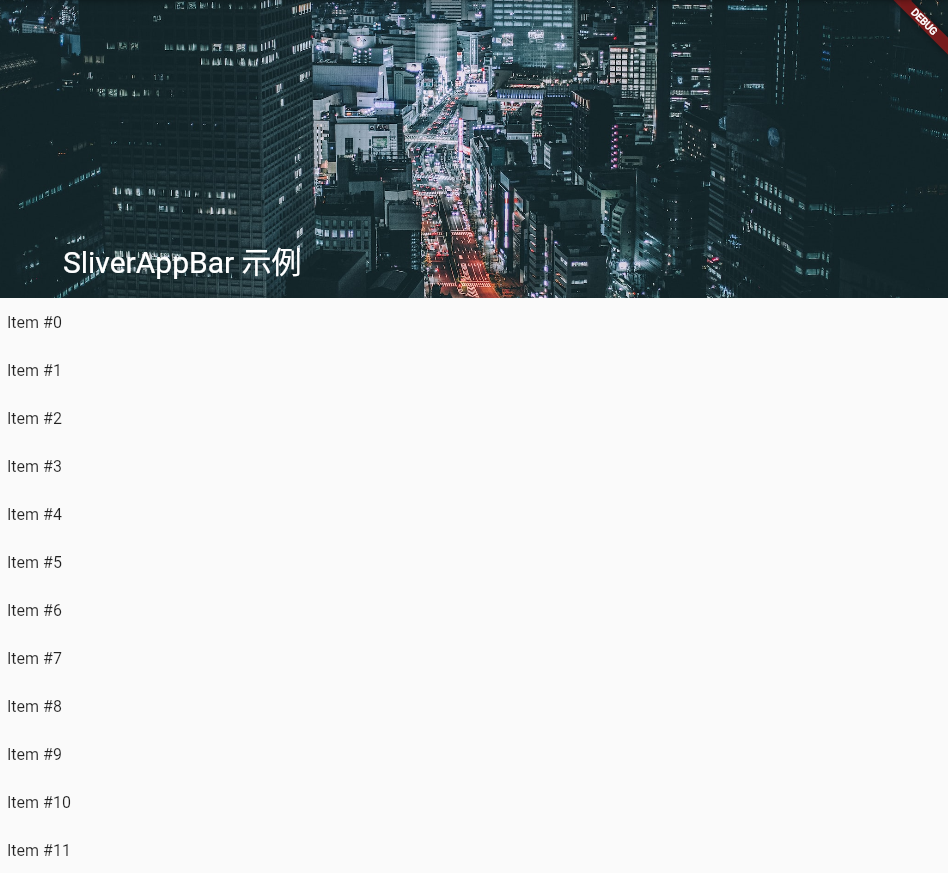
尚未滾動前(滾動範圍尚未超過expandedHeight),我們可以看到背景的街道圖片完整的呈現
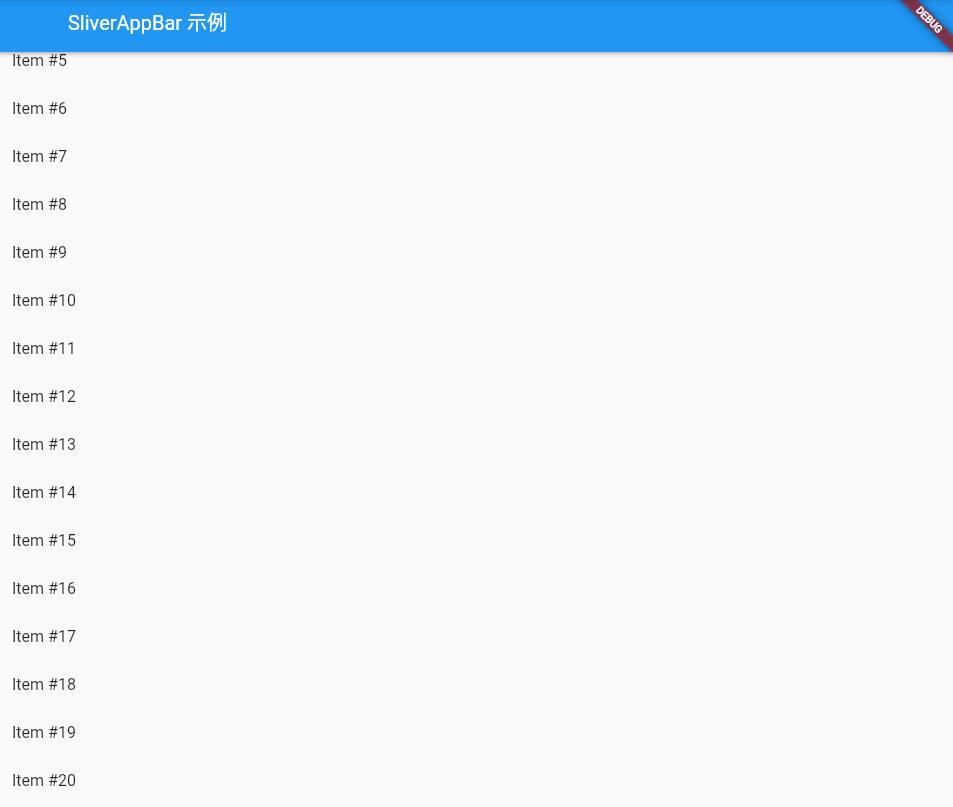
在滾動的過程中會將AppBar摺疊放置,僅會顯示SilverAppBar的名稱
參、Achieve fancy scrolling: 每周天氣預報頁面展示

參見: https://docs.flutter.dev/ui/layout/scrolling/slivers
參見: Building scrolling experiences in Flutter | Workshop Codelab

我們結合上述範例,來做一個簡易的每周天氣預報頁面展示,將分為兩大部分「元件佈局區塊」、「資料傳遞區塊」

一、元件佈局區塊

在HorizonsApp的class中,包含以下

  1. HorizonsApp class:
  • 為應用程式的主要入口點,繼承於StatelessWidget。

  • 創建了一個CustomScrollView,顯示SliverAppBar的背景圖片、標題與自定義設定。

  1. WeeklyForecastList class:
  • 一個自訂滾動列表,繼承自 StatelessWidget。

  • 使用 SliverList 建立了一個捲動列表,用於顯示一週的天氣預報資訊。

  • 透過 SliverChildBuilderDelegate,根據資料動態建立每天的天氣預報卡。

  • 每張卡片中,包含了天氣影像、日期、天氣狀況描述以及高溫和低溫資訊。

二、資料傳遞區塊

  1. Server class:
  • 包含一些用於取得虛擬天氣資料的靜態方法,包括 getDailyForecastList 和 getDailyForecastByID。
  1. DailyForecast class:
  • 表示每日天氣預報的資料模型(Model)。

  • 包括 Id、圖像ID、高溫、低溫和描述等屬性。

  • 包含了一些獲取日期和星期幾資訊的方法。

  1. ConstantScrollBehavior class:
  • 一個自訂的滾動行為,用於保持在不同平台下滾動體驗的一致性。

  • 主要用於設定滾動條和滾動物理特性。

  1. 資料和圖像連結:
  • 提供了一些虛擬資料,如每日天氣預報資訊和圖像連結。

  • 這些資料和圖像用於填充天氣預報清單和應用程式欄的內容。

注意: 在資料傳遞的區塊內,有涉及與後端資料模型串接的格式與傳遞的方式,在此不詳加敘述,有興趣的同學可以再去加以研究!本段程式碼主要以結構化的概念與頁面呈現為主要宗旨!

明天我們將會連同程式與執行結果展示出來!